


Product Details
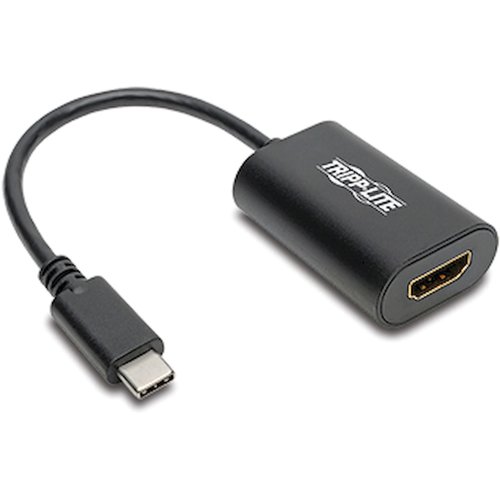
USB 3.1, Gen-1, USB-C to HDMI 4K Adapter M/F helps you transmit digital audio and 4K video from your tablet, laptop, Chromebook, MacBook, smartphone or PC to an HDMI-enabled television, monitor or projector. It's an ideal tool for giving video presentations in conference rooms and classrooms, editing multiple documents on a larger screen or streaming video for digital signage in crystal-clear 4K. With a source device that also supports USB DisplayPort Alternate Mode, you can extend video from your primary display to another, duplicate the same video on both displays or change the second display to your primary. The plug-and-play adapter requires no software, drivers or external power. Connect the reversible USB-C plug to your source device's USB-C or Thunderbolt 3 port. Fumble-free USB-C plug connects in either direction to ensure fast, easy connection every time. Then, connect the HDMI port to your display using an HDMI cable sold separately.
| Product Type | A/V Adapter |
| Additional Warranty Information | 3 year limited warranty |
| Connector Type On First End | USB 3.1 Gen 1 Type C - Male |
| Connector Type On Second End | HDMI Digital Audio/Video - Female |
| Adapter Type | HDMI/USB-C |
| Product Color | Black |
| Color Family | Black |
| Connector On First End Details | 1 x USB Type C USB 3.1 Gen 1 USB Male |
| Connector On Second End Details | 1 x HDMI Digital Audio/Video Female |
| Country Of Origin | China |
| Height | 0.6" |
| Width | 1.8" |
| Brand Name | Tripp Lite by Eaton |
| Features | Plug and Play |
| Length | 1.1" |
| Manufacturer | Eaton Corporation |
| Product Name | USB-C to HDMI 4K 60Hz Adapter |
| Manufacturer Part Number | U44406NHD4K6 |
| Manufacturer Website Address | http://www.eaton.com |
| Marketing Information | USB 3.1, Gen-1, USB-C to HDMI 4K Adapter (M/F) helps you transmit digital audio and 4K video from your tablet, laptop, Chromebook, MacBook, smartphone or PC to an HDMI-enabled television, monitor or projector. It's an ideal tool for giving video presentations in conference rooms and classrooms, editing multiple documents on a larger screen or streaming video for digital signage in crystal-clear 4K. With a source device that also supports USB DisplayPort Alternate Mode, you can extend video from your primary display to another, duplicate the same video on both displays or change the second display to your primary. The plug-and-play adapter requires no software, drivers or external power. Connect the reversible USB-C plug to your source device's USB-C or Thunderbolt 3 port. Fumble-free USB-C plug connects in either direction to ensure fast, easy connection every time. Then, connect the HDMI port to your display using an HDMI cable (sold separately). |
| Packaged Quantity | 1 Each |
| Green Indicator | Y |
